
 Dan K. Snelson
Leverage swiftDialog to make user-friendly scripts

Introduction-to-Setup-Your-Mac.bashIntroduction
Prior to Bart Reardon releasing swiftDialog, we used Jamf Helper for our modest needs and Carsten Blüm’s Pashua when we had more complex requirements.
(If you’re a Jamf customer and unfamiliar with Jamf Helper, launch Terminal and execute the following command on an enrolled Mac:)
/Library/Application\ Support/JAMF/bin/jamfHelper.app/Contents/MacOS/jamfHelper -help
As we’ve now migrated most of our user-interactive scripts to swiftDialog, I thought it might prove helpful to others if I documented the process I follow to leverage swiftDialog to make user-friendly scripts.
Previous Projects
Here are few examples from previous projects.
- The Disk Usage with swiftDialog script end up being more than 700 lines of code for essentially the following two commands:
du -I System -axrg / 2>/dev/null | sort -nr | head -n 50 >> "$diskUsageEntireVolumeTop50"
du -axrg "$loggedInUserHome" 2>/dev/null | sort -nr | head -n 50 >> "$diskUsageUsersHomeTop50"
- The User-friendly sysdiagnose script required nearly 600 lines for the following command:
echo -ne '\n' | sysdiagnose -u -A sysdiagnose_"${serialNumber}"_"${timestamp}" -f "$sysdiagnoseProgressDirectory" -V / | cat > "$sysdiagnoseExecutionLog" &
- Inventory Update Progress with swiftDialog was more than 330 lines for a simple
jamf recon
/usr/local/bin/jamf recon -endUsername "${loggedInUser}" --verbose >> "$inventoryLog" &
Obviously, writing the so-called “user-friendly” part of scripts adds a significant amount of code.
Current Project
While we’ve migrated away from Jamf Pro policies which are triggered by Enrollment Complete, we thought our new users may benefit from being greeted to their new Macs immediately after the built-in macOS Setup Assistant completes and before they start actually setting up their Mac (and if the policy executes, great; if it fails, it’s not the end-of-the-world.)
Here’s a quick-and-dirty personalized greeting using osascript, which has been built-in since in Mac OS X 10.0. However, we’d like to display a screencast of what our new users can expected when setting up their Macs.
loggedInUser=$( echo "show State:/Users/ConsoleUser" | scutil | awk '/Name :/ { print $3 }' )
loggedInUserFullname=$( id -F "${loggedInUser}" )
loggedInUserFirstname=$( echo "$loggedInUserFullname" | cut -d " " -f 1 )
osascript -e 'display dialog "Greetings, '"${loggedInUserFirstname}"'!" with title "Setup Your Mac" buttons {"Close"} with icon note'

A. Setup
We’ve been quite happy with Visual Studio Code since making the transition from Atom as our preferred editor and James Smith has an excellent presentation on Visual Studio Code for Mac Admins.
I’m still writing in Bash — despite Armin Briegel’s repeated warnings — and I purposely end my scripts in .bash to help me remember I need to transition them to “zsh, sh, or bash v5.”
Here are the first 15 lines of our script:
#!/bin/bash

####################################################################################################
#
# Introduction to Setup Your Mac via swiftDialog
# https://snelson.us/2022/12/swiftdialog-izing-your-scripts/
#
####################################################################################################
#
# HISTORY
#
#   Version 0.0.1, 03-Dec-2022, Dan K. Snelson (@dan-snelson)
#   - Greet the user immediately after Setup Assistant completes and before they start actually setting up their Mac
#
####################################################################################################
B. Variables
While the finished script only needs to display the user’s first name and the day of the week, we’ll want to send a quit command to the running dialog as the script exits (and we might want to update something), so we’ll include a dialogCommandFile variable.
(See Armin’s Setting the PATH in Scripts to better understand the export PATH command. )
####################################################################################################
#
# Variables
#
####################################################################################################

scriptVersion="0.0.1"
export PATH=/usr/bin:/bin:/usr/sbin:/sbin:/usr/local/bin/
scriptLog="${4:-"/var/tmp/org.churchofjesuschrist.log"}"
dialogBinary="/usr/local/bin/dialog"
dialogCommandFile=$( mktemp /var/tmp/dialogCommandFile.XXX )
loggedInUser=$( echo "show State:/Users/ConsoleUser" | scutil | awk '/Name :/ { print $3 }' )
dayOfTheWeek=$( date +'%A' )
(I learned from Alex White’s Type in Use that for one element to contrast with another, it needs to be three times the size of the other, which is why I try to always have three blank lines between code blocks.)
C. Pre-flight Checks
Previously, this code was some of the first placed under the Program heading.
However, I think it’s more clear to have a dedicated section for Pre-flight Checks as failures here will result in the script exiting, and code in the Program section will never be executed.
####################################################################################################
#
# Pre-flight Checks
#
####################################################################################################

# # # # # # # # # # # # # # # # # # # # # # # # # # # # # # # # # # # # # # # # # # # # # # # # # #
# Confirm script is running as root
# # # # # # # # # # # # # # # # # # # # # # # # # # # # # # # # # # # # # # # # # # # # # # # # # #

if [[ $(id -u) -ne 0 ]]; then
    echo "This script must be run as root; exiting."
    exit 1
fi


# # # # # # # # # # # # # # # # # # # # # # # # # # # # # # # # # # # # # # # # # # # # # # # # # #
# Validate Setup Assistant has completed
# # # # # # # # # # # # # # # # # # # # # # # # # # # # # # # # # # # # # # # # # # # # # # # # # #

while pgrep -q -x "Setup Assistant" ; do
    echo "Setup Assistant is running; pausing for 10 seconds"
    sleep 10
done

echo "Setup Assistant is no longer running; proceeding …"


# # # # # # # # # # # # # # # # # # # # # # # # # # # # # # # # # # # # # # # # # # # # # # # # # #
# Confirm Dock is running / user is at Desktop
# # # # # # # # # # # # # # # # # # # # # # # # # # # # # # # # # # # # # # # # # # # # # # # # # #

while ! pgrep -q -x "Dock" ; do
    echo "Dock is NOT running; pausing for 10 seconds"
    sleep 10
done

echo "Dock is running; proceeding …"


# # # # # # # # # # # # # # # # # # # # # # # # # # # # # # # # # # # # # # # # # # # # # # # # # #
# Validate logged-in user
# # # # # # # # # # # # # # # # # # # # # # # # # # # # # # # # # # # # # # # # # # # # # # # # # #

if [[ -z "${loggedInUser}" || "${loggedInUser}" == "loginwindow" ]]; then
    echo "No user logged-in; exiting."
    quitScript "1"
else
    loggedInUserFullname=$( id -F "${loggedInUser}" )
    loggedInUserFirstname=$( echo "$loggedInUserFullname" | cut -d " " -f 1 )
    loggedInUserID=$(id -u "${loggedInUser}")
fi
D. Dialog
The following lines control both the functionality and the look-and-feel of the “Introduction” dialog and leverage swiftDialog v2.0’s ability to play videos.
####################################################################################################
#
# Introduction dialog
#
####################################################################################################

# # # # # # # # # # # # # # # # # # # # # # # # # # # # # # # # # # # # # # # # # # # # # # # # # #
# "Introduction" dialog Title, Message, Overlay Icon and Icon
# # # # # # # # # # # # # # # # # # # # # # # # # # # # # # # # # # # # # # # # # # # # # # # # # #

title="Happy ${dayOfTheWeek}, ${loggedInUserFirstname}!"
caption="Please review this video while we get things ready."
videoID="vimeoid=774283815"


# # # # # # # # # # # # # # # # # # # # # # # # # # # # # # # # # # # # # # # # # # # # # # # # # #
# "Introduction" dialog Settings and Features
# # # # # # # # # # # # # # # # # # # # # # # # # # # # # # # # # # # # # # # # # # # # # # # # # #

dialogIntroduction="--title \"$title\" \
--video \"$videoID\" \
--videocaption \"$caption\" \
--infotext \"$scriptVersion\" \
--button1text \"Close\" \
--autoplay \
--moveable \
--ontop \
--width '800' \
--height '600' \
--commandfile \"$dialogCommandFile\" "

E. Functions
Nearly every script which leverages swiftDialog includes the following functions, which I purposely preface with the non-required word function to help me differentiate between where the function is defined and when its called.
####################################################################################################
#
# Functions
#
####################################################################################################

# # # # # # # # # # # # # # # # # # # # # # # # # # # # # # # # # # # # # # # # # # # # # # # # # #
# Client-side Script Logging
# # # # # # # # # # # # # # # # # # # # # # # # # # # # # # # # # # # # # # # # # # # # # # # # # #

function updateScriptLog() {
    echo -e "$( date +%Y-%m-%d\ %H:%M:%S ) - ${1}" | tee -a "${scriptLog}"
}


# # # # # # # # # # # # # # # # # # # # # # # # # # # # # # # # # # # # # # # # # # # # # # # # # #
# Client-side Logging
# # # # # # # # # # # # # # # # # # # # # # # # # # # # # # # # # # # # # # # # # # # # # # # # # #

if [[ ! -f "${scriptLog}" ]]; then
    touch "${scriptLog}"
    updateScriptLog "*** Created log file via script ***"
fi


# # # # # # # # # # # # # # # # # # # # # # # # # # # # # # # # # # # # # # # # # # # # # # # # # #
# Logging preamble
# # # # # # # # # # # # # # # # # # # # # # # # # # # # # # # # # # # # # # # # # # # # # # # # # #

updateScriptLog "\n\n###\n# Introduction to Setup Your Mac (${scriptVersion})\n###\n"


# # # # # # # # # # # # # # # # # # # # # # # # # # # # # # # # # # # # # # # # # # # # # # # # # #
# Check for / install swiftDialog (Thanks big bunches, @acodega!)
# # # # # # # # # # # # # # # # # # # # # # # # # # # # # # # # # # # # # # # # # # # # # # # # # #

function dialogCheck() {

    # Get the URL of the latest PKG From the Dialog GitHub repo
    dialogURL=$(curl --silent --fail "https://api.github.com/repos/bartreardon/swiftDialog/releases/latest" | awk -F '"' "/browser_download_url/ && /pkg\"/ { print \$4; exit }")

    # Expected Team ID of the downloaded PKG
    expectedDialogTeamID="PWA5E9TQ59"

    # Check for Dialog and install if not found
    if [ ! -e "/Library/Application Support/Dialog/Dialog.app" ]; then

        updateScriptLog "Dialog not found. Installing..."

        # Create temporary working directory
        workDirectory=$( /usr/bin/basename "$0" )
        tempDirectory=$( /usr/bin/mktemp -d "/private/tmp/$workDirectory.XXXXXX" )

        # Download the installer package
        /usr/bin/curl --location --silent "$dialogURL" -o "$tempDirectory/Dialog.pkg"

        # Verify the download
        teamID=$(/usr/sbin/spctl -a -vv -t install "$tempDirectory/Dialog.pkg" 2>&1 | awk '/origin=/ {print $NF }' | tr -d '()')

        # Install the package if Team ID validates
        if [[ "$expectedDialogTeamID" == "$teamID" ]]; then

            /usr/sbin/installer -pkg "$tempDirectory/Dialog.pkg" -target /
            sleep 2
            updateScriptLog "swiftDialog version $(dialog --version) installed; proceeding..."

        else

            # Display a so-called "simple" dialog if Team ID fails to validate
            runAsUser osascript -e 'display dialog "Please advise your Support Representative of the following error:\r\r• Dialog Team ID verification failed\r\r" with title "Setup Your Mac: Error" buttons {"Close"} with icon caution'
            quitScript "1"

        fi

        # Remove the temporary working directory when done
        /bin/rm -Rf "$tempDirectory"

    else

        updateScriptLog "swiftDialog version $(dialog --version) found; proceeding..."

    fi

}


# # # # # # # # # # # # # # # # # # # # # # # # # # # # # # # # # # # # # # # # # # # # # # # # # #
# Update the "Introduction" dialog
# # # # # # # # # # # # # # # # # # # # # # # # # # # # # # # # # # # # # # # # # # # # # # # # # #

function dialogUpdateIntroduction(){
    updateScriptLog "INTRODUCTION DIALOG: $1"
    echo "$1" >> "$dialogCommandFile"
    sleep 0.35
}


# # # # # # # # # # # # # # # # # # # # # # # # # # # # # # # # # # # # # # # # # # # # # # # # # #
# Kill a specified process (thanks, @grahampugh!)
# # # # # # # # # # # # # # # # # # # # # # # # # # # # # # # # # # # # # # # # # # # # # # # # # #

function killProcess() {
    process="$1"
    if process_pid=$( pgrep -a "${process}" 2>/dev/null ) ; then
        updateScriptLog "Attempting to terminate the '$process' process …"
        updateScriptLog "(Termination message indicates success.)"
        kill "$process_pid" 2> /dev/null
        if pgrep -a "$process" >/dev/null ; then
            updateScriptLog "ERROR: '$process' could not be terminated."
        fi
    else
        updateScriptLog "The '$process' process isn't running."
    fi
}


# # # # # # # # # # # # # # # # # # # # # # # # # # # # # # # # # # # # # # # # # # # # # # # # # #
# Quit Script (thanks, @bartreadon!)
# # # # # # # # # # # # # # # # # # # # # # # # # # # # # # # # # # # # # # # # # # # # # # # # # #

function quitScript() {

    updateScriptLog "Quitting …"
    dialogUpdateIntroduction "quit:"

    # Stop `caffeinate` process
    updateScriptLog "De-caffeinate …"
    killProcess "caffeinate"

    # Remove dialogCommandFile
    if [[ -e ${dialogCommandFile} ]]; then
        updateScriptLog "Removing ${dialogCommandFile} …"
        rm "${dialogCommandFile}"
    fi

    exit "${1}"

}
F. Program
With all of the so-called “heavy lifting” handled by the functions, the actual Program section is fairly sparse.
####################################################################################################
#
# Program
#
####################################################################################################

# # # # # # # # # # # # # # # # # # # # # # # # # # # # # # # # # # # # # # # # # # # # # # # # # #
# Ensure computer does not go to sleep while running this script (thanks, @grahampugh!)
# # # # # # # # # # # # # # # # # # # # # # # # # # # # # # # # # # # # # # # # # # # # # # # # # #

updateScriptLog "Caffeinating this script (PID: $$)"
caffeinate -dimsu -w $$ &


# # # # # # # # # # # # # # # # # # # # # # # # # # # # # # # # # # # # # # # # # # # # # # # # # #
# Validate swiftDialog is installed
# # # # # # # # # # # # # # # # # # # # # # # # # # # # # # # # # # # # # # # # # # # # # # # # # #

dialogCheck


# # # # # # # # # # # # # # # # # # # # # # # # # # # # # # # # # # # # # # # # # # # # # # # # # #
# Display Introduction dialog
# # # # # # # # # # # # # # # # # # # # # # # # # # # # # # # # # # # # # # # # # # # # # # # # # #

# eval "${dialogBinary} --args ${dialogIntroduction}"
su - "${loggedInUser}" -c "open -a ${dialogBinary} --args ${dialogIntroduction} & sleep 0.35"


# # # # # # # # # # # # # # # # # # # # # # # # # # # # # # # # # # # # # # # # # # # # # # # # # #
# Exit
# # # # # # # # # # # # # # # # # # # # # # # # # # # # # # # # # # # # # # # # # # # # # # # # # #

quitScript "0"
Note: Issue No. 203 was discovered while writing this post and the normal eval approach (shown on Line No. 301) is not currently working as expected.
G. Complete Script
Here’s the complete script, which is suitable to add to a Jamf Pro policy with an Enrollment Complete trigger, simply change the videoID variable before deploying.
(Latest version is available on GitHub.)
#!/bin/bash

####################################################################################################
#
# Introduction to Setup Your Mac via swiftDialog
# https://snelson.us/2022/12/swiftdialog-izing-your-scripts/
#
####################################################################################################
#
# HISTORY
#
#   Version 0.0.1, 03-Dec-2022, Dan K. Snelson (@dan-snelson)
#   - Greet the user immediately after Setup Assistant completes and before they start actually setting up their Mac
#
####################################################################################################


####################################################################################################
#
# Variables
#
####################################################################################################

scriptVersion="0.0.1"
export PATH=/usr/bin:/bin:/usr/sbin:/sbin:/usr/local/bin/
scriptLog="${4:-"/var/tmp/org.churchofjesuschrist.log"}"
dialogBinary="/usr/local/bin/dialog"
dialogCommandFile=$( mktemp /var/tmp/dialogCommandFile.XXX )
loggedInUser=$( echo "show State:/Users/ConsoleUser" | scutil | awk '/Name :/ { print $3 }' )
dayOfTheWeek=$( date +'%A' )


####################################################################################################
#
# Pre-flight Checks
#
####################################################################################################

# # # # # # # # # # # # # # # # # # # # # # # # # # # # # # # # # # # # # # # # # # # # # # # # # #
# Confirm script is running as root
# # # # # # # # # # # # # # # # # # # # # # # # # # # # # # # # # # # # # # # # # # # # # # # # # #

if [[ $(id -u) -ne 0 ]]; then
    echo "This script must be run as root; exiting."
    exit 1
fi


# # # # # # # # # # # # # # # # # # # # # # # # # # # # # # # # # # # # # # # # # # # # # # # # # #
# Validate Setup Assistant has completed
# # # # # # # # # # # # # # # # # # # # # # # # # # # # # # # # # # # # # # # # # # # # # # # # # #

while pgrep -q -x "Setup Assistant" ; do
    echo "Setup Assistant is running; pausing for 10 seconds"
    sleep 10
done

echo "Setup Assistant is no longer running; proceeding …"


# # # # # # # # # # # # # # # # # # # # # # # # # # # # # # # # # # # # # # # # # # # # # # # # # #
# Confirm Dock is running / user is at Desktop
# # # # # # # # # # # # # # # # # # # # # # # # # # # # # # # # # # # # # # # # # # # # # # # # # #

while ! pgrep -q -x "Dock" ; do
    echo "Dock is NOT running; pausing for 10 seconds"
    sleep 10
done

echo "Dock is running; proceeding …"


# # # # # # # # # # # # # # # # # # # # # # # # # # # # # # # # # # # # # # # # # # # # # # # # # #
# Validate logged-in user
# # # # # # # # # # # # # # # # # # # # # # # # # # # # # # # # # # # # # # # # # # # # # # # # # #

if [[ -z "${loggedInUser}" || "${loggedInUser}" == "loginwindow" ]]; then
    echo "No user logged-in; exiting."
    quitScript "1"
else
    loggedInUserFullname=$( id -F "${loggedInUser}" )
    loggedInUserFirstname=$( echo "$loggedInUserFullname" | cut -d " " -f 1 )
    loggedInUserID=$(id -u "${loggedInUser}")
fi


####################################################################################################
#
# Introduction dialog
#
####################################################################################################

# # # # # # # # # # # # # # # # # # # # # # # # # # # # # # # # # # # # # # # # # # # # # # # # # #
# "Introduction" dialog Title, Message, Overlay Icon and Icon
# # # # # # # # # # # # # # # # # # # # # # # # # # # # # # # # # # # # # # # # # # # # # # # # # #

title="Happy ${dayOfTheWeek}, ${loggedInUserFirstname}!"
caption="Please review this video while we get things ready."
videoID="vimeoid=774283815"


# # # # # # # # # # # # # # # # # # # # # # # # # # # # # # # # # # # # # # # # # # # # # # # # # #
# "Introduction" dialog Settings and Features
# # # # # # # # # # # # # # # # # # # # # # # # # # # # # # # # # # # # # # # # # # # # # # # # # #

dialogIntroduction="--title \"$title\" \
--video \"$videoID\" \
--videocaption \"$caption\" \
--infotext \"$scriptVersion\" \
--button1text \"Close\" \
--autoplay \
--moveable \
--ontop \
--width '800' \
--height '600' \
--commandfile \"$dialogCommandFile\" "


####################################################################################################
#
# Functions
#
####################################################################################################

# # # # # # # # # # # # # # # # # # # # # # # # # # # # # # # # # # # # # # # # # # # # # # # # # #
# Client-side Script Logging
# # # # # # # # # # # # # # # # # # # # # # # # # # # # # # # # # # # # # # # # # # # # # # # # # #

function updateScriptLog() {
    echo -e "$( date +%Y-%m-%d\ %H:%M:%S ) - ${1}" | tee -a "${scriptLog}"
}


# # # # # # # # # # # # # # # # # # # # # # # # # # # # # # # # # # # # # # # # # # # # # # # # # #
# Client-side Logging
# # # # # # # # # # # # # # # # # # # # # # # # # # # # # # # # # # # # # # # # # # # # # # # # # #

if [[ ! -f "${scriptLog}" ]]; then
    touch "${scriptLog}"
    updateScriptLog "*** Created log file via script ***"
fi


# # # # # # # # # # # # # # # # # # # # # # # # # # # # # # # # # # # # # # # # # # # # # # # # # #
# Logging preamble
# # # # # # # # # # # # # # # # # # # # # # # # # # # # # # # # # # # # # # # # # # # # # # # # # #

updateScriptLog "\n\n###\n# Introduction to Setup Your Mac (${scriptVersion})\n###\n"


# # # # # # # # # # # # # # # # # # # # # # # # # # # # # # # # # # # # # # # # # # # # # # # # # #
# Check for / install swiftDialog (Thanks big bunches, @acodega!)
# # # # # # # # # # # # # # # # # # # # # # # # # # # # # # # # # # # # # # # # # # # # # # # # # #

function dialogCheck() {

    # Get the URL of the latest PKG From the Dialog GitHub repo
    dialogURL=$(curl --silent --fail "https://api.github.com/repos/bartreardon/swiftDialog/releases/latest" | awk -F '"' "/browser_download_url/ && /pkg\"/ { print \$4; exit }")

    # Expected Team ID of the downloaded PKG
    expectedDialogTeamID="PWA5E9TQ59"

    # Check for Dialog and install if not found
    if [ ! -e "/Library/Application Support/Dialog/Dialog.app" ]; then

        updateScriptLog "Dialog not found. Installing..."

        # Create temporary working directory
        workDirectory=$( /usr/bin/basename "$0" )
        tempDirectory=$( /usr/bin/mktemp -d "/private/tmp/$workDirectory.XXXXXX" )

        # Download the installer package
        /usr/bin/curl --location --silent "$dialogURL" -o "$tempDirectory/Dialog.pkg"

        # Verify the download
        teamID=$(/usr/sbin/spctl -a -vv -t install "$tempDirectory/Dialog.pkg" 2>&1 | awk '/origin=/ {print $NF }' | tr -d '()')

        # Install the package if Team ID validates
        if [[ "$expectedDialogTeamID" == "$teamID" ]]; then

            /usr/sbin/installer -pkg "$tempDirectory/Dialog.pkg" -target /
            sleep 2
            updateScriptLog "swiftDialog version $(dialog --version) installed; proceeding..."

        else

            # Display a so-called "simple" dialog if Team ID fails to validate
            runAsUser osascript -e 'display dialog "Please advise your Support Representative of the following error:\r\r• Dialog Team ID verification failed\r\r" with title "Setup Your Mac: Error" buttons {"Close"} with icon caution'
            quitScript "1"

        fi

        # Remove the temporary working directory when done
        /bin/rm -Rf "$tempDirectory"

    else

        updateScriptLog "swiftDialog version $(dialog --version) found; proceeding..."

    fi

}


# # # # # # # # # # # # # # # # # # # # # # # # # # # # # # # # # # # # # # # # # # # # # # # # # #
# Update the "Introduction" dialog
# # # # # # # # # # # # # # # # # # # # # # # # # # # # # # # # # # # # # # # # # # # # # # # # # #

function dialogUpdateIntroduction(){
    updateScriptLog "INTRODUCTION DIALOG: $1"
    echo "$1" >> "$dialogCommandFile"
    sleep 0.35
}


# # # # # # # # # # # # # # # # # # # # # # # # # # # # # # # # # # # # # # # # # # # # # # # # # #
# Kill a specified process (thanks, @grahampugh!)
# # # # # # # # # # # # # # # # # # # # # # # # # # # # # # # # # # # # # # # # # # # # # # # # # #

function killProcess() {
    process="$1"
    if process_pid=$( pgrep -a "${process}" 2>/dev/null ) ; then
        updateScriptLog "Attempting to terminate the '$process' process …"
        updateScriptLog "(Termination message indicates success.)"
        kill "$process_pid" 2> /dev/null
        if pgrep -a "$process" >/dev/null ; then
            updateScriptLog "ERROR: '$process' could not be terminated."
        fi
    else
        updateScriptLog "The '$process' process isn't running."
    fi
}


# # # # # # # # # # # # # # # # # # # # # # # # # # # # # # # # # # # # # # # # # # # # # # # # # #
# Quit Script (thanks, @bartreadon!)
# # # # # # # # # # # # # # # # # # # # # # # # # # # # # # # # # # # # # # # # # # # # # # # # # #

function quitScript() {

    updateScriptLog "Quitting …"
    dialogUpdateIntroduction "quit:"

    # Stop `caffeinate` process
    updateScriptLog "De-caffeinate …"
    killProcess "caffeinate"

    # Remove dialogCommandFile
    if [[ -e ${dialogCommandFile} ]]; then
        updateScriptLog "Removing ${dialogCommandFile} …"
        rm "${dialogCommandFile}"
    fi

    exit "${1}"

}


####################################################################################################
#
# Program
#
####################################################################################################

# # # # # # # # # # # # # # # # # # # # # # # # # # # # # # # # # # # # # # # # # # # # # # # # # #
# Ensure computer does not go to sleep while running this script (thanks, @grahampugh!)
# # # # # # # # # # # # # # # # # # # # # # # # # # # # # # # # # # # # # # # # # # # # # # # # # #

updateScriptLog "Caffeinating this script (PID: $$)"
caffeinate -dimsu -w $$ &


# # # # # # # # # # # # # # # # # # # # # # # # # # # # # # # # # # # # # # # # # # # # # # # # # #
# Validate swiftDialog is installed
# # # # # # # # # # # # # # # # # # # # # # # # # # # # # # # # # # # # # # # # # # # # # # # # # #

dialogCheck


# # # # # # # # # # # # # # # # # # # # # # # # # # # # # # # # # # # # # # # # # # # # # # # # # #
# Display Introduction dialog
# # # # # # # # # # # # # # # # # # # # # # # # # # # # # # # # # # # # # # # # # # # # # # # # # #

# eval "${dialogBinary} --args ${dialogIntroduction}"
su - "${loggedInUser}" -c "open -a ${dialogBinary} --args ${dialogIntroduction} & sleep 0.35"


# # # # # # # # # # # # # # # # # # # # # # # # # # # # # # # # # # # # # # # # # # # # # # # # # #
# Exit
# # # # # # # # # # # # # # # # # # # # # # # # # # # # # # # # # # # # # # # # # # # # # # # # # #

quitScript "0"
Bonus: Capturing User Input
While this Introduction-to-Setup-Your-Mac.bash script didn’t require capturing user input, it’s a common feature of most swiftDialog scripts.
Simple
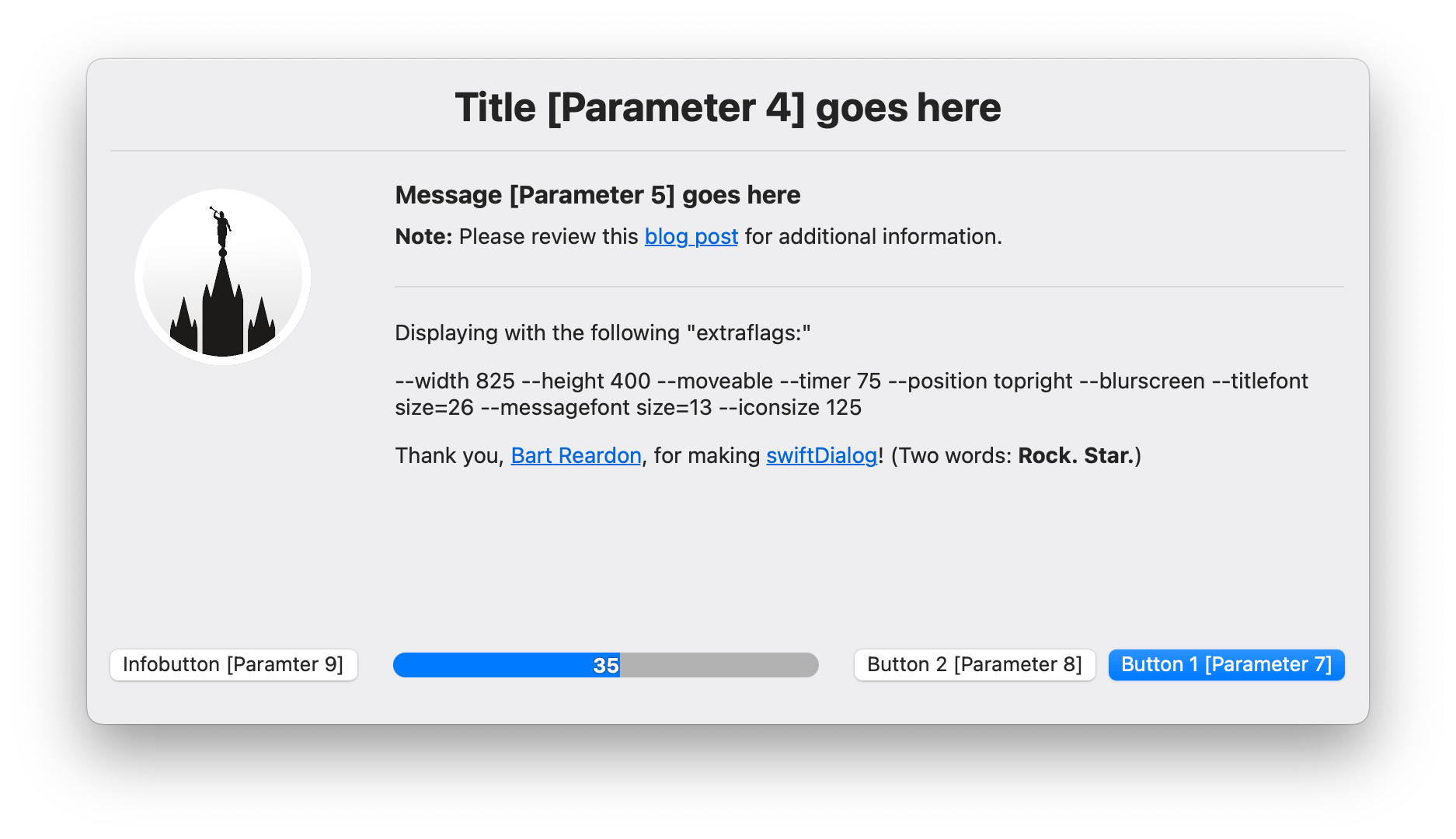
For a simple example, the Display Message via swiftDialog script sets a variable returncode equal to $? which “Expands to the status of the most recently executed foreground pipeline” to capture which button the user clicked. The various options for returncode are then processed in a case statement:
0The user clickedbutton12The user clickedbutton23The user clickedbutton3(i.e.,infobutton)4The user allowed the timer to expire20The user had Do Not Disturb enabled*Catch-all processing for every other condition
# # # # # # # # # # # # # # # # # # # # # # # # # # # # # # # # # # # # # # # # # # # # # # # # # #
# Display Message: Dialog
# # # # # # # # # # # # # # # # # # # # # # # # # # # # # # # # # # # # # # # # # # # # # # # # # #

updateScriptLog "Title: ${title}"
updateScriptLog "Message: ${message}"

${dialogApp} \
    ${titleoption} "${title}" \
    ${messageoption} "${message}" \
    ${iconoption} "${icon}" \
    ${button1option} "${button1text}" \
    ${button2option} "${button2text}" \
    ${infobuttonoption} "${infobuttontext}" \
    --infobuttonaction "https://servicenow.company.com/support?id=kb_article_view&sysparm_article=${infobuttontext}" \
    --messagefont "size=14" \
    --commandfile "$dialogMessageLog}" \
    ${extraflags}

returncode=$?


case ${returncode} in

    0)  ## Process exit code 0 scenario here
        echo "${loggedInUser} clicked ${button1text}"
        updateScriptLog "${loggedInUser} clicked ${button1text};"
        if [[ -n "${action}" ]]; then
           su - "${loggedInUser}" -c "open \"${action}\""
        fi
        quitScript "0"
        ;;

    2)  ## Process exit code 2 scenario here
        echo "${loggedInUser} clicked ${button2text}"
        updateScriptLog "${loggedInUser} clicked ${button2text};"
        quitScript "0"
        ;;

    3)  ## Process exit code 3 scenario here
        echo "${loggedInUser} clicked ${infobuttontext}"
        updateScriptLog "${loggedInUser} clicked ${infobuttontext};"
        ;;

    4)  ## Process exit code 4 scenario here
        echo "${loggedInUser} allowed timer to expire"
        updateScriptLog "${loggedInUser} allowed timer to expire;"
        ;;

    20) ## Process exit code 20 scenario here
        echo "${loggedInUser} had Do Not Disturb enabled"
        updateScriptLog "${loggedInUser} had Do Not Disturb enabled"
        quitScript "0"
        ;;

    *)  ## Catch all processing
        echo "Something else happened; Exit code: ${returncode}"
        updateScriptLog "Something else happened; Exit code: ${returncode};"
        quitScript "1"
        ;;

esac
Complex

Setup Your Mac (1.5.0) includes a more complex example which leverages and parses JSON (thanks to none other than Bart Reardon):
- The JSON is defined in the
welcomeJSONvariable
# # # # # # # # # # # # # # # # # # # # # # # # # # # # # # # # # # # # # # # # # # # # # # # # # #
# "Welcome" JSON (thanks, @bartreardon!)
# # # # # # # # # # # # # # # # # # # # # # # # # # # # # # # # # # # # # # # # # # # # # # # # # #

welcomeJSON='{
    "title" : "'"${welcomeTitle}"'",
    "message" : "'"${welcomeMessage}"'",
    "icon" : "'"${welcomeIcon}"'",
    "iconsize" : "198.0",
    "button1text" : "Continue",
    "button2text" : "Quit",
    "infotext" : "'"${scriptVersion}"'",
    "blurscreen" : "true",
    "ontop" : "true",
    "titlefont" : "size=26",
    "messagefont" : "size=16",
    "textfield" : [
        {   "title" : "Comment",
            "required" : false,
            "prompt" : "Enter a comment",
            "editor" : true
        },
        {   "title" : "Computer Name",
            "required" : false,
            "prompt" : "Computer Name"
        },
        {   "title" : "User Name",
            "required" : false,
            "prompt" : "User Name"
        },
        {   "title" : "Asset Tag",
            "required" : true,
            "prompt" : "Please enter the seven-digit Asset Tag",
            "regex" : "^(AP|IP)?[0-9]{7,}$",
            "regexerror" : "Please enter (at least) seven digits for the Asset Tag, optionally preceed by either AP or IP."
        }
    ],
  "selectitems" : [
        {   "title" : "Department",
            "default" : "Please select your department",
            "values" : [
                "Please select your department",
                "Asset Management",
                "Australia Area Office",
                "Board of Directors",
                "Business Development",
                "Corporate Communications",
                "Creative Services",
                "Customer Service / Customer Experience",
                "Engineering",
                "Finance / Accounting",
                "General Management",
                "Human Resources",
                "Information Technology / Technology",
                "Investor Relations",
                "Legal",
                "Marketing",
                "Operations",
                "Product Management",
                "Production",
                "Project Management Office",
                "Purchasing / Sourcing",
                "Quality Assurance",
                "Risk Management",
                "Sales",
                "Strategic Initiatives & Programs",
                "Technology"
            ]
        },
        {   "title" : "Select B",
            "values" : [
                "B1",
                "B2",
                "B3"
            ]
        },
        {   "title" : "Select C",
            "values" : [
                "C1",
                "C2",
                "C3"
            ]
        }
    ],
    "height" : "635"
}'
- The
welcomeJSONvariable is written to disk
# # # # # # # # # # # # # # # # # # # # # # # # # # # # # # # # # # # # # # # # # # # # # # # # # #
# Write Welcome JSON to disk
# # # # # # # # # # # # # # # # # # # # # # # # # # # # # # # # # # # # # # # # # # # # # # # # # #

echo "$welcomeJSON" > "$welcomeCommandFile"
- A
get_json_value_welcomeDialogfunction parses the JSON
# # # # # # # # # # # # # # # # # # # # # # # # # # # # # # # # # # # # # # # # # # # # # # # # # #
# Parse JSON via osascript and JavaScript for the Welcome dialog (thanks, @bartreardon!)
# # # # # # # # # # # # # # # # # # # # # # # # # # # # # # # # # # # # # # # # # # # # # # # # # #

function get_json_value_welcomeDialog () {
    for var in "${@:2}"; do jsonkey="${jsonkey}['${var}']"; done
    JSON="$1" osascript -l 'JavaScript' \
        -e 'const env = $.NSProcessInfo.processInfo.environment.objectForKey("JSON").js' \
        -e "JSON.parse(env)$jsonkey"
}
- Using command substitution, the user’s input is assigned to the
welcomeResultsvariable and additional variables are assigned for each input field via theget_json_value_welcomeDialogfunction
# # # # # # # # # # # # # # # # # # # # # # # # # # # # # # # # # # # # # # # # # # # # # # # # # #
# Display Welcome dialog and capture user's input
# # # # # # # # # # # # # # # # # # # # # # # # # # # # # # # # # # # # # # # # # # # # # # # # # #

if [[ "${welcomeDialog}" == "true" ]]; then

    welcomeResults=$( ${dialogApp} --jsonfile "$welcomeCommandFile" --json )
    if [[ -z "${welcomeResults}" ]]; then
        welcomeReturnCode="2"
    else
        welcomeReturnCode="0"
    fi

    case "${welcomeReturnCode}" in

        0)  # Process exit code 0 scenario here
            updateScriptLog "WELCOME DIALOG: ${loggedInUser} entered information and clicked Continue"

            ###
            # Extract the various values from the welcomeResults JSON
            ###

            comment=$(get_json_value_welcomeDialog "$welcomeResults" "Comment")
            computerName=$(get_json_value_welcomeDialog "$welcomeResults" "Computer Name")
            userName=$(get_json_value_welcomeDialog "$welcomeResults" "User Name")
            assetTag=$(get_json_value_welcomeDialog "$welcomeResults" "Asset Tag")
            department=$(get_json_value_welcomeDialog "$welcomeResults" "Department" "selectedValue")
            selectB=$(get_json_value_welcomeDialog "$welcomeResults" "Select B" "selectedValue")
            selectC=$(get_json_value_welcomeDialog "$welcomeResults" "Select C" "selectedValue")


            ###
            # Output the various values from the welcomeResults JSON to the log file
            ###

            updateScriptLog "WELCOME DIALOG: • Comment: $comment"
            updateScriptLog "WELCOME DIALOG: • Computer Name: $computerName"
            updateScriptLog "WELCOME DIALOG: • User Name: $userName"
            updateScriptLog "WELCOME DIALOG: • Asset Tag: $assetTag"
            updateScriptLog "WELCOME DIALOG: • Department: $department"
            updateScriptLog "WELCOME DIALOG: • Select B: $selectB"
            updateScriptLog "WELCOME DIALOG: • Select C: $selectC"


            ###
            # Evaluate Various User Input
            ###

            # Computer Name
            if [[ -n "${computerName}" ]]; then

                # UNTESTED, UNSUPPORTED "YOYO" EXAMPLE
                updateScriptLog "WELCOME DIALOG: Set Computer Name …"
                currentComputerName=$( scutil --get ComputerName )
                currentLocalHostName=$( scutil --get LocalHostName )

                # Sets LocalHostName to a maximum of 15 characters, comprised of first eight characters of the computer's
                # serial number and the last six characters of the client's MAC address
                firstEightSerialNumber=$( system_profiler SPHardwareDataType | awk '/Serial\ Number\ \(system\)/ {print $NF}' | cut -c 1-8 )
                lastSixMAC=$( ifconfig en0 | awk '/ether/ {print $2}' | sed 's/://g' | cut -c 7-12 )
                newLocalHostName=${firstEightSerialNumber}-${lastSixMAC}

                if [[ "${debugMode}" == "true" ]]; then

                    updateScriptLog "WELCOME DIALOG: DEBUG MODE: Renamed computer from: \"${currentComputerName}\" to \"${computerName}\" "
                    updateScriptLog "WELCOME DIALOG: DEBUG MODE: Renamed LocalHostName from: \"${currentLocalHostName}\" to \"${newLocalHostName}\" "

                else

                    # Set the Computer Name to the user-entered value
                    scutil --set ComputerName "${computerName}"

                    # Set the LocalHostName to `newLocalHostName`
                    scutil --set LocalHostName "${newLocalHostName}"

                    # Delay required to reflect change …
                    # … side-effect is a delay in the "Setup Your Mac" dialog appearing
                    sleep 5
                    updateScriptLog "WELCOME DIALOG: Renamed computer from: \"${currentComputerName}\" to \"$( scutil --get ComputerName )\" "
                    updateScriptLog "WELCOME DIALOG: Renamed LocalHostName from: \"${currentLocalHostName}\" to \"$( scutil --get LocalHostName )\" "

                fi

            else

                updateScriptLog "WELCOME DIALOG: ${loggedInUser} did NOT specify a new computer name"
                updateScriptLog "WELCOME DIALOG: • Current Computer Name: \"$( scutil --get ComputerName )\" "
                updateScriptLog "WELCOME DIALOG: • Current Local Host Name: \"$( scutil --get LocalHostName )\" "

            fi

            # User Name
            if [[ -n "${userName}" ]]; then
                # UNTESTED, UNSUPPORTED "YOYO" EXAMPLE
                reconOptions+="-endUsername \"${userName}\" "
            fi

            # Asset Tag
            if [[ -n "${assetTag}" ]]; then
                reconOptions+="-assetTag \"${assetTag}\" "
            fi

            # Department
            if [[ -n "${department}" ]]; then
                # UNTESTED, UNSUPPORTED "YOYO" EXAMPLE
                reconOptions+="-department \"${department}\" "
            fi

            # Output `recon` options to log
            updateScriptLog "WELCOME DIALOG: reconOptions: ${reconOptions}"

            ###
            # Display "Setup Your Mac" dialog (and capture Process ID)
            ###

            eval "${dialogSetupYourMacCMD[*]}" & sleep 0.3
            dialogSetupYourMacProcessID=$!
            ;;

        2)  # Process exit code 2 scenario here
            updateScriptLog "WELCOME DIALOG: ${loggedInUser} clicked Quit at Welcome dialog"
            completionActionOption="Quit"
            quitScript "1"
            ;;

        3)  # Process exit code 3 scenario here
            updateScriptLog "WELCOME DIALOG: ${loggedInUser} clicked infobutton"
            osascript -e "set Volume 3"
            afplay /System/Library/Sounds/Glass.aiff
            ;;

        4)  # Process exit code 4 scenario here
            updateScriptLog "WELCOME DIALOG: ${loggedInUser} allowed timer to expire"
            quitScript "1"
            ;;

        *)  # Catch all processing
            updateScriptLog "WELCOME DIALOG: Something else happened; Exit code: ${welcomeReturnCode}"
            quitScript "1"
            ;;

    esac

else

    ###
    # Display "Setup Your Mac" dialog (and capture Process ID)
    ###

    eval "${dialogSetupYourMacCMD[*]}" & sleep 0.3
    dialogSetupYourMacProcessID=$!

fi


